> ## Documentation Index
> Fetch the complete documentation index at: https://help.coresee.com/llms.txt
> Use this file to discover all available pages before exploring further.

# Delete a Room

Organize by deleting Coresee rooms you no longer use. This helps maintain a clutter-free and streamlined homepage experience.
<div
  style={{
position: 'relative',
paddingBottom: 'calc(55.28511821974965% + 41px)',
height: '0',
width: '100%'
}}
>
  <iframe
    src="https://demo.arcade.software/8upWY3dyHMuuvpLdni6W?embed&embed_mobile=inline&embed_desktop=inline&show_copy_link=true"
    title="Delete a Room from the Homepage"
    frameBorder="0"
    loading="lazy"
    allowFullScreen
    allow="clipboard-write; autoplay"
    style={{
position: 'absolute',
top: 0,
left: 0,
width: '100%',
height: '100%'
}}
  />
</div>

<Steps>
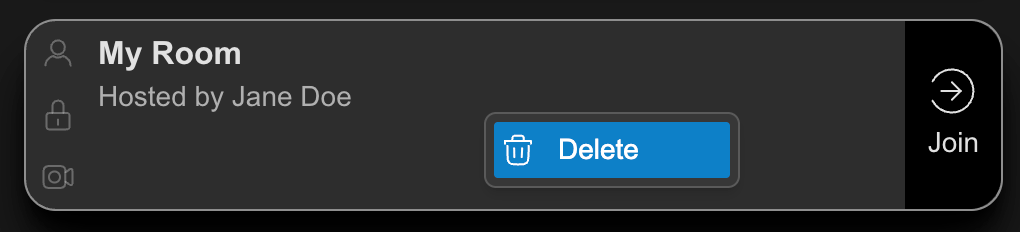
  <Step title="From the homepage, right-click the card of a room you've created. ">
    <Frame>
      <img src="https://mintcdn.com/likemindedlabs/pVEisE1nES9YQq5H/images/delete_room.png?fit=max&auto=format&n=pVEisE1nES9YQq5H&q=85&s=bc8ea86e0aa87404b7899452b0671262" alt="Delete Room" width="1020" height="232" data-path="images/delete_room.png" />
    </Frame>
  </Step>

  <Step title="Click Delete">
    <Info>
      You are unable to delete a room when there is an active session.
    </Info>
  </Step>

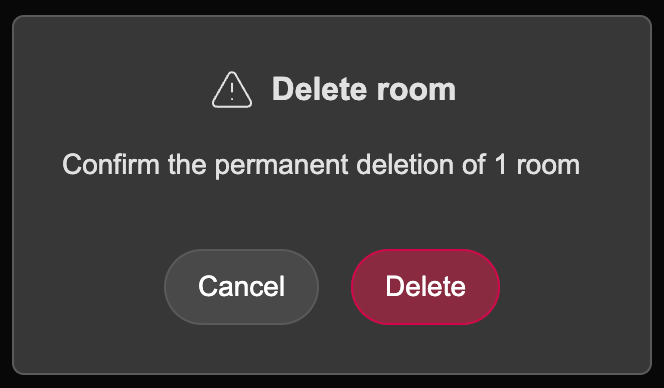
  <Step title="Confirm your selection by clicking Delete, or select Cancel to return to the homepage.">
    <Frame>
      <img src="https://mintcdn.com/likemindedlabs/pVEisE1nES9YQq5H/images/confirm_delete_room.png?fit=max&auto=format&n=pVEisE1nES9YQq5H&q=85&s=27591e6f439f50f53558ce7911770a8b" alt="Confirm Delete Room" title="Confirm Delete Room" className="mx-auto" style={{ width:"58%" }} width="664" height="388" data-path="images/confirm_delete_room.png" />
    </Frame>
  </Step>
</Steps>

<Danger>
  Once a room is deleted, all of its contents are permanently removed and cannot be recovered.
</Danger>
